How to fill the Gumroad checkout
Six fields. The card fields only appear after you click the card box.
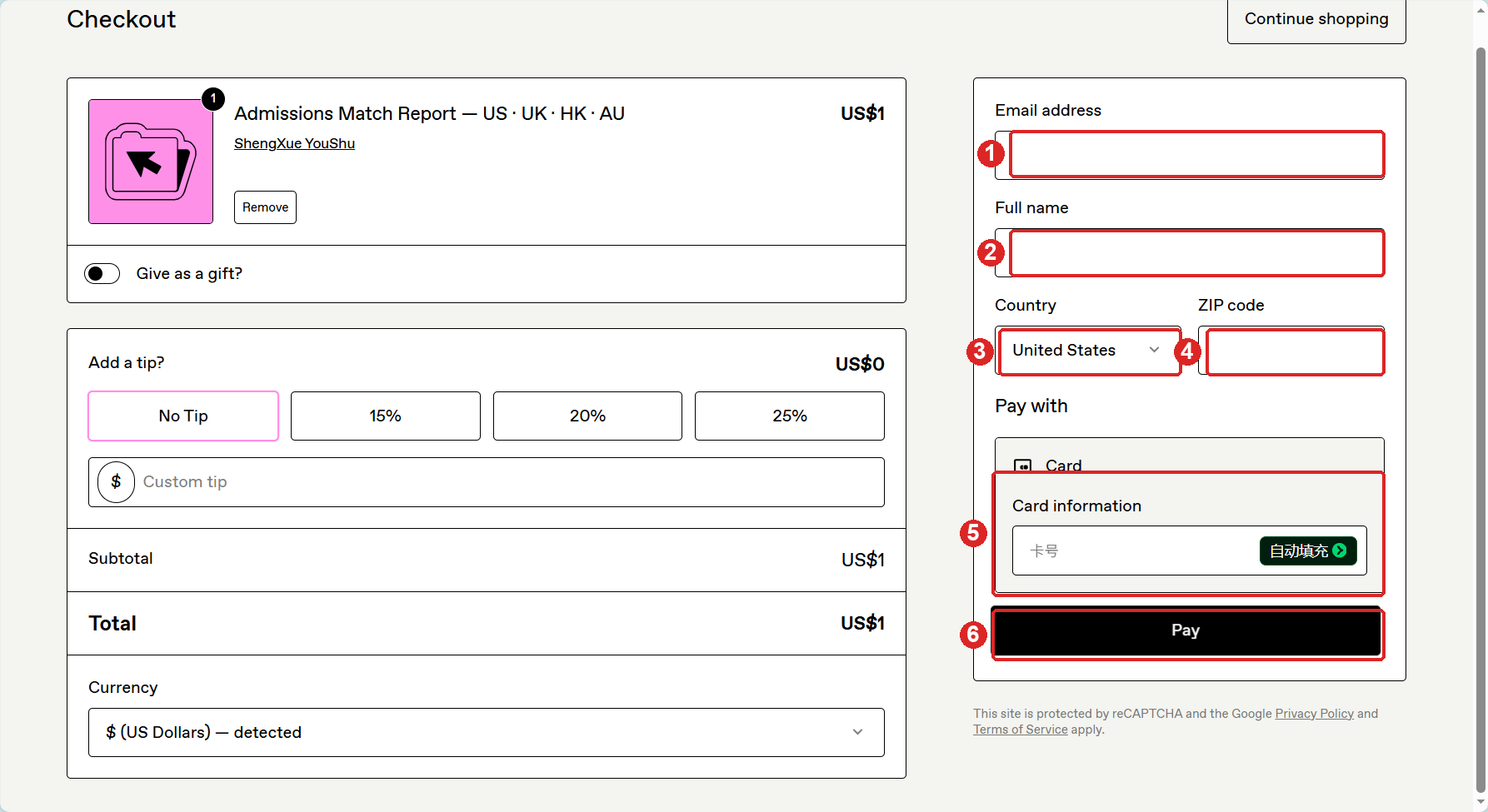
- Email address — use an email you can open. Your receipt and license key are sent there.
- Full name — the name on the card.
- Country — the card's issuing country, not where you are now. If you use a VPN, turn it off or match the card's country.
- ZIP / postal code — the billing postal code registered with the card. US card: 5-digit ZIP. China card: 6-digit postal code. If unsure, use the address on file with your bank.
- Card information — click this box and it expands into three fields: card number, MM/YY, CVC. Fill all three. The CVC is the 3 digits on the back (4 on Amex).
- Pay — if your bank asks for 3-D Secure, approve it in your banking app, then come back.
If the page only "blinks" when you press Pay, one of the card fields or the ZIP is empty, or the country does not match the card. Nothing was charged.
FAQ
- Why does the form show a VAT number instead of ZIP?
- The fields change with the country. EU countries ask for an optional VAT number and may add VAT. Leave the VAT number blank for a personal purchase.
- The card fields have no fixed position / do not appear
- It is a Stripe card element. Click the "Card information" box once; the number, expiry and CVC fields appear inside it. If nothing appears, disable browser extensions or try an incognito window.
- Pay does nothing or the page flickers
- Usually an incomplete field. Check the card number, expiry, CVC and ZIP. Also make sure Country matches the card's issuing country.
- Card declined
- Virtual and prepaid cards are often declined for international online payments. Use a real Visa or Mastercard with online/international payments enabled.
- No Google Pay / PayPal button
- The available methods depend on your browser and region. Card payment always works.
中文说明
1 邮箱:填你能收信的邮箱,收据和授权码发到这里。2 姓名:卡上的名字。3 国家:选卡的发卡国,不是你现在所在的国家;用 VPN 的话关掉或切到发卡国。4 邮编:卡账单地址的邮编,中国卡填 6 位邮编,美国卡填 5 位 ZIP。5 卡信息:点一下卡号框会展开三格,填卡号、有效期、CVC(卡背面 3 位)。6 Pay:银行要求 3D 验证时在手机银行确认。
如果点 Pay 只闪一下,通常是某一格没填全,或国家与发卡国不一致,并没有扣款。